Building a Production Browser Agent on AWS
How to wire together AgentCore Browser, Nova Act, and IAM authentication to build a production browser agent on AWS, with complete working code.

I’ve been building an MCP server that gives AI agents a cloud-hosted browser. The idea is straightforward: an agent calls a tool, a real browser spins up in AWS, Nova Act drives it, and the agent gets back whatever it asked for. No local browser, no API keys, scalable.
Getting there meant wiring together AgentCore Browser for the cloud-hosted browser and session persistence, Nova Act for the AI-driven automation, and Nova Act’s Workflow class to authenticate through IAM instead of an API key. Each piece has its own docs and SDK, and I had to figure out how they fit together.
This post is what I wish I’d had when I started. The complete pattern, in one place, so you don’t have to piece it together yourself.
What we’re building
Here’s what the production setup looks like at a high level:
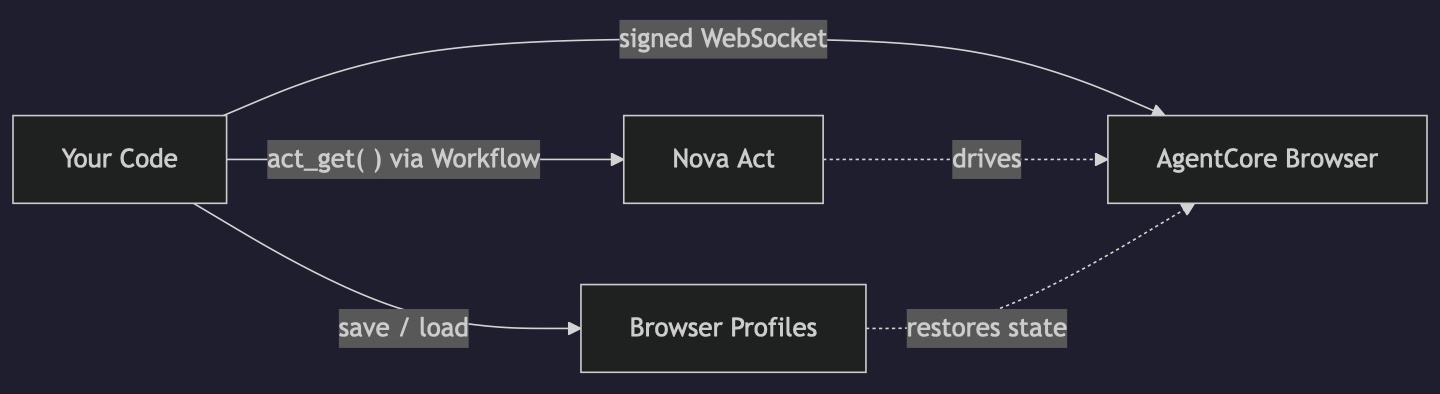
- AgentCore Browser runs a containerized Chrome instance in AWS. Your code connects to it over WebSocket using signed headers (no browser on your machine).
- Nova Act with a Workflow authenticates through IAM instead of an API key. The
Workflowclass handles the credential exchange with the Nova Act service. - Browser profiles persist cookies and local storage between sessions, so your agent can maintain logged-in state across runs.
The code ties these together: start a cloud browser, sign the WebSocket connection, open a Workflow for IAM auth, run Nova Act against the remote browser, save the session state, and clean up.
Prerequisites
Before writing any code, you need a few things set up.
AWS credentials configured for local development (via ~/.aws/credentials, SSO, or environment variables). These need permissions for both bedrock-agentcore and nova-act services. When you deploy to AWS, you’d use an IAM role instead.
A Nova Act workflow definition. This is an AWS resource that you create once. The easiest way is the Nova Act CLI:
1
2
pip install nova-act
act workflow create --name my-browser-agent
You can also create it in the Nova Act console. The name you pick here is what you’ll pass to the Workflow class later.
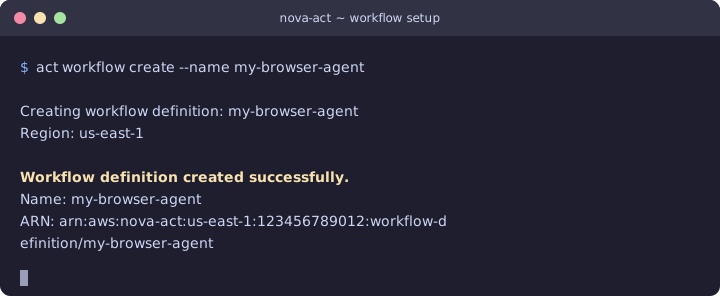
Creating the workflow definition. You only need to do this once.
A browser profile (optional, but you’ll want one). Create it with boto3:
1
2
3
4
5
6
7
8
import boto3

cp = boto3.client("bedrock-agentcore-control", region_name="us-west-2")
response = cp.create_browser_profile(
    name="my_agent_profile",
    description="Persistent session state for my browser agent",
)
print(response["profileId"])  # Save this, you'll need it
Python packages:
1
pip install nova-act bedrock-agentcore boto3
At the time of writing, that’s nova-act 3.1.x and bedrock-agentcore 1.4.x.
The complete pattern
Here’s the full working script. I’ll break it down piece by piece after.
1
2
3
4
5
6
7
8
9
10
11
12
13
14
15
16
17
18
19
20
21
22
23
24
25
26
27
28
29
30
31
32
33
34
35
36
37
38
39
40
41
import boto3
from bedrock_agentcore.tools.browser_client import BrowserClient
from nova_act import NovaAct, Workflow

REGION = "us-west-2"
PROFILE_ID = "my_agent_profile-XXXXX"  # The profileId returned by create_browser_profile
WORKFLOW_NAME = "my-browser-agent"  # From act workflow create above

# 1. Start a cloud browser session, loading any saved profile state
client = BrowserClient(region=REGION)
session_id = client.start(
    name="production-run",
    session_timeout_seconds=3600,
    profile_configuration={"profileIdentifier": PROFILE_ID},
)

# 2. Get signed WebSocket headers for the CDP connection
ws_url, ws_headers = client.generate_ws_headers()

# 3. Open a Workflow for IAM auth, then run Nova Act against the remote browser
with Workflow(model_id="nova-act-latest", workflow_definition_name=WORKFLOW_NAME) as wf:
    with NovaAct(
        starting_page="https://example.com",
        cdp_endpoint_url=ws_url,
        cdp_headers=ws_headers,
        workflow=wf,
        ignore_https_errors=True,
    ) as nova:
        result = nova.act_get("What is the main heading on this page?")
        print(result.response)

# 4. Save session state (cookies, local storage) back to the profile
dp = boto3.client("bedrock-agentcore", region_name=REGION)
dp.save_browser_session_profile(
    profileIdentifier=PROFILE_ID,
    browserIdentifier=client.identifier,
    sessionId=session_id,
)

# 5. Clean up
client.stop()
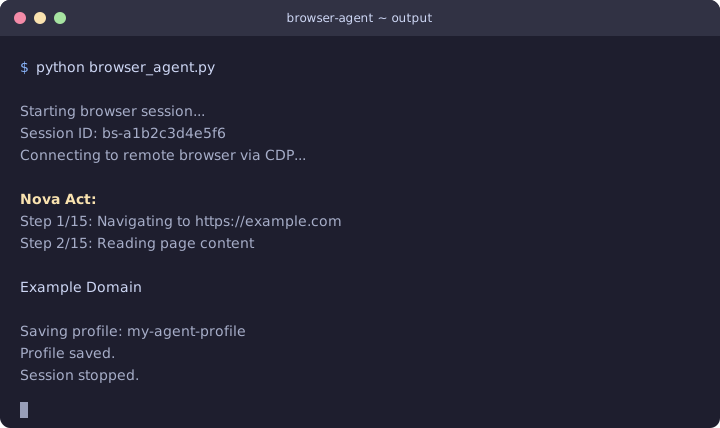
Example output. The agent connects to the cloud browser, reads the page, saves the profile, and shuts down.
That’s it. No API keys anywhere. Let me walk through what each piece does.
Step by step
Starting the cloud browser
1
2
3
4
5
6
client = BrowserClient(region=REGION)
session_id = client.start(
    name="production-run",
    session_timeout_seconds=3600,
    profile_configuration={"profileIdentifier": PROFILE_ID},
)
BrowserClient is the high-level wrapper from the bedrock-agentcore SDK. When you call start(), it provisions a containerized Chrome instance in AWS and returns a session ID. The profile_configuration parameter tells it to load any previously saved cookies and local storage from that profile, so if your agent logged in during a previous session, it starts this one already authenticated.
We’re using the default browser that comes with every AWS account (aws.browser.v1). If you need custom proxy settings or Chrome extensions, you can create your own browser definition, but the default works for most cases.
The session_timeout_seconds controls how long the browser stays alive if you stop talking to it. Max is 8 hours (28,800 seconds).
Signing the WebSocket connection
1
ws_url, ws_headers = client.generate_ws_headers()
This is the part that tripped me up initially. The cloud browser exposes a Chrome DevTools Protocol (CDP) endpoint over WebSocket, but you can’t just connect to it directly. The connection requires SigV4-signed headers. generate_ws_headers() handles the signing and returns both the URL and the auth headers you need to pass to Nova Act.
IAM authentication with Workflow
1
with Workflow(model_id="nova-act-latest", workflow_definition_name=WORKFLOW_NAME) as wf:
When you use Nova Act locally with an API key, you don’t need a Workflow. But for IAM auth, the Workflow context manager is required. It creates a workflow run when you enter the context and updates its status when you exit. All the Nova Act API calls inside (creating sessions, running steps) are associated with this workflow run.
The model_id can be nova-act-latest (tracks the latest GA release), nova-act-v1.0 (pinned), or nova-act-preview (latest preview features).
Connecting Nova Act to the remote browser
1
2
3
4
5
6
7
8
9
with NovaAct(
    starting_page="https://example.com",
    cdp_endpoint_url=ws_url,
    cdp_headers=ws_headers,
    workflow=wf,
    ignore_https_errors=True,
) as nova:
    result = nova.act_get("What is the main heading on this page?")
    print(result.response)
Three parameters connect everything together:
cdp_endpoint_urlandcdp_headerspoint Nova Act at the remote browser instead of launching a local oneworkflowtells it to use IAM auth through the Workflow you opened above
The ignore_https_errors=True is worth explaining. When Nova Act connects to a remote browser, it still tries to validate SSL certificates from your local machine. Since the browser is running in the cloud (not locally), this check can fail depending on your local cert store. Setting this flag sidesteps the issue.
One thing to flag here: I’m using act_get(), not act(). More on why in the tips section below.
Saving the profile
1
2
3
4
5
6
dp = boto3.client("bedrock-agentcore", region_name=REGION)
dp.save_browser_session_profile(
    profileIdentifier=PROFILE_ID,
    browserIdentifier=client.identifier,
    sessionId=session_id,
)
This persists the current browser state (cookies, local storage) back to the profile. Next time you start a session with this profile, it picks up where you left off.
The save uses the data plane client (bedrock-agentcore), not the control plane client you used to create the profile. You need the browserIdentifier and sessionId from the active session, which BrowserClient exposes as properties.
Profile saves are explicit. If you skip this step, any new cookies or session state from this run are lost when the browser session ends.
Once you have the basic pattern working, you can point it at anything. Swap out the starting_page and the act_get() prompt, and you’re off. Here’s an example pulling the top stories from Hacker News:
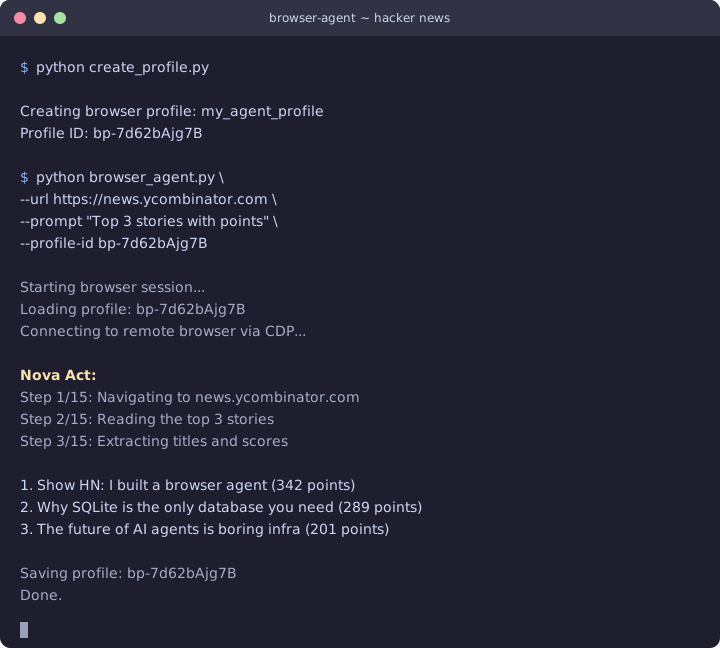
Example output. Profile persistence means the agent can pick up where it left off between runs.
Some Notes
act() vs act_get(): This caught me early on. act() runs the browser action and returns metadata, but it strips the model’s text response. If you ask “what’s on this page?” with act(), you get back an object with step counts and timing, but no answer. Use act_get() for anything where you need text or data back. You can also pass a Pydantic schema to act_get() for structured extraction.
Two boto3 clients, two service names: Browser profile CRUD operations (create, list, delete) use bedrock-agentcore-control. Session operations and profile saves use bedrock-agentcore. It’s a control plane / data plane split, and it’s easy to mix them up.
Nova Act is only in us-east-1: The Nova Act service runs in US East (N. Virginia). AgentCore Browser is available in 14 regions. Your Workflow talks to Nova Act in us-east-1, while your BrowserClient can run in whatever region is closest to the websites you’re automating against. The SDK handles this. Just be aware that the two region parameters in your code may be different.
Workflow definitions are reusable: You create the workflow definition once and reference it by name in every run. Each with Workflow(...) creates a new workflow run under that definition. You don’t need to recreate the definition between runs.
What’s next
This pattern covers the core loop: start a cloud browser, authenticate with IAM, automate with Nova Act, persist state. From here you might want to:
- Wrap it in an agent framework like Strands Agents, where Nova Act becomes a tool the agent can call alongside other capabilities
- Use the live view to watch your agent work in real time (AgentCore Browser provides an HTTPS URL for this)
- Add session recording for debugging and compliance (saves to S3)
The AgentCore Browser docs cover these features, and the Nova Act GitHub repo has more examples of structured extraction and multi-step workflows. The companion code for this post is on GitHub if you want a runnable starting point.
If you’re interested in the MCP server I’m building on top of all this, connect with me on LinkedIn and let me know.