OpSlop and How to Avoid It
AI agents deploying infrastructure directly into your AWS account is ClickOps at machine speed. The Agent Toolkit for AWS shows how to keep agents producing IaC instead.
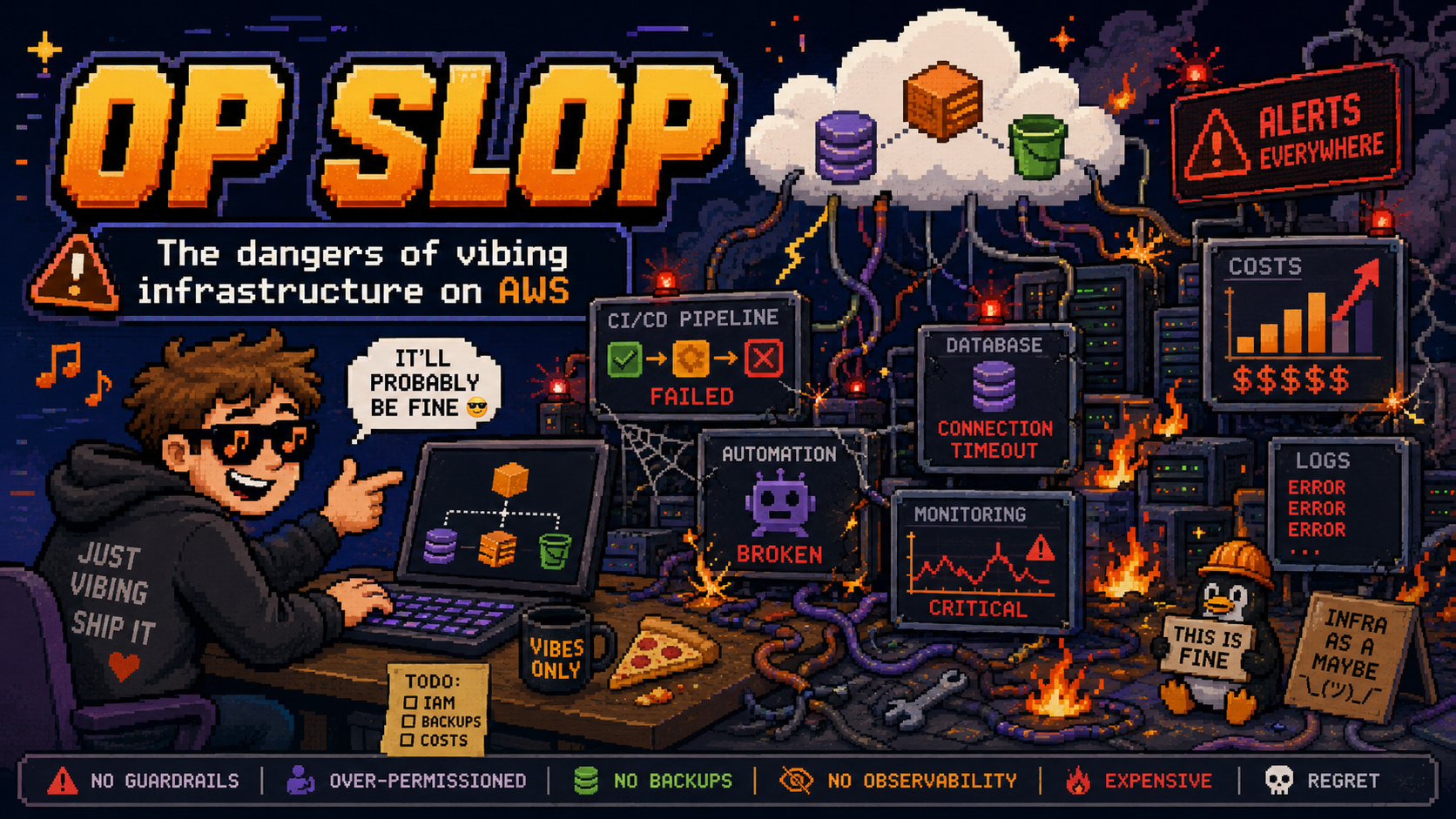
We spent a decade getting rid of ClickOps. Let’s not replace it with something worse.
AI coding agents can now provision cloud infrastructure. Claude Code, Cursor, Codex, Kiro, and others can call AWS APIs directly, create resources, modify configurations, and deploy applications. This is genuinely powerful. It’s also a trap if you don’t think about what happens next.
I’m calling the trap “OpSlop”: the anti-pattern where AI agents deploy infrastructure directly into your AWS account through imperative API calls, with no source of truth, no version control, and no way to reproduce what was built. It’s vibe coding applied to infrastructure, and it leaves you with an account full of resources that nobody (including the agent) can explain or recreate.
ClickOps is dead. Long live… what exactly?
The industry fought hard to move beyond ClickOps. We built CloudFormation, Terraform, CDK, Pulumi, and SAM specifically because clicking through the AWS Console to create resources doesn’t scale. Firefly’s 2025 State of Infrastructure as Code report found that 89% of organisations have adopted IaC, but only 6% have achieved complete cloud codification. That gap represents ongoing ClickOps, and the problems are well-understood:
- No reproducibility. If you need the same setup in another region or account, you’re starting from scratch.
- No audit trail. Who created that security group rule? When? Why?
- Drift. Production and staging diverge silently because someone tweaked something by hand. Firefly’s data shows 90% of large-scale IaC deployments experience drift, and about half goes unnoticed.
- No review process. Changes happen without peer review or approval gates.
Infrastructure as Code solved these problems. Every resource is defined in files, stored in Git, reviewed in PRs, and deployed through pipelines. If something breaks, you roll back. If you need another environment, you deploy the same code.
But then we gave AI agents a terminal and told them to “deploy this to AWS.”
OpSlop is ClickOps at machine speed
When an AI agent runs aws s3api create-bucket or aws ec2 run-instances directly, it’s doing exactly what a human did in the Console, just faster and with less visibility. The agent creates real resources with real cost implications, and the only record of what happened is buried in your shell history, your agent’s conversation log, and of course CloudTrail.
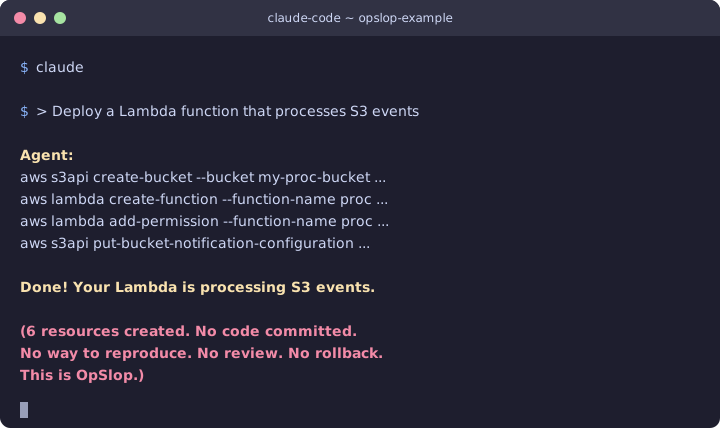 Six resources created. No code committed. No way to reproduce. This is OpSlop.
This is worse than ClickOps in three specific ways:
Speed and volume. A human clicking through the Console might create five or six resources in an afternoon. An agent can create dozens in minutes, across multiple services, with complex interdependencies you didn’t ask for.
Opacity. At least when a human creates resources manually, they presumably understand what they created. An agent might provision a VPC with six subnets, a NAT gateway, three security groups, and an Internet Gateway because that’s what its training data suggested, regardless of whether you needed any of it.
Compounding decisions. Agents make choices in sequence without documenting their reasoning. Why did it pick t3.large instead of t3.medium? Why is the security group open on port 8080? The context is gone the moment the conversation ends.
The Agent Toolkit for AWS: doing it right
AWS just launched the Agent Toolkit for AWS as a managed way to give AI agents access to AWS services. It includes an MCP server, curated skills, and plugins for Claude Code, Codex, and other agents.
What caught my attention is how it addresses the OpSlop problem directly. From the launch blog post:
When asked to build infrastructure, [agents] tend to reach for the AWS CLI rather than AWS CDK or CloudFormation, and they produce IAM policies that are far broader than necessary. The result is infrastructure that works in a demo but is not production-ready.
We explicitly acknowledging the problem. The toolkit’s answer is a combination of guidance (skills that teach agents to use IaC) and controls (IAM-based guardrails that limit what agents can do).
Rules files and skills that guide agents toward IaC
The toolkit’s GitHub repo includes a rules file (rules/aws-agent-rules.md) with a direct instruction:
“When creating infrastructure, prefer infrastructure-as-code (AWS CDK or CloudFormation) over direct CLI commands.”
This gets loaded into the agent’s context. It’s a soft constraint, not a technical lock, but it works. The aws-core plugin bundles dedicated skills for both CDK and CloudFormation that provide step-by-step workflows: cdk synth --strict, then cdk diff, then cdk deploy. The CloudFormation skill covers template authoring, a three-layer validation pipeline (cfn-lint for syntax, cfn-guard for security/compliance, change sets for pre-deploy review), and troubleshooting.
Instead of the agent improvising with CLI commands, it follows tested procedures that produce code. The output is files you can commit, review, and redeploy.
But… we still need to be careful! The toolkit does not technically enforce IaC. If your IAM role has write permissions, the agent can still call aws ec2 run-instances directly through the call_aws tool. The skills provide guidance, not a hard block. For enforcement, you need to pair the skills with IAM policies, which is where the condition keys come in.
IAM condition keys that separate agent from human
The toolkit adds two global condition context keys to every request made through the AWS MCP Server:
aws:ViaAWSMCPService– a Boolean,truefor any request through an AWS managed MCP serveraws:CalledViaAWSMCP– a string containing the service principal (e.g.,aws-mcp.amazonaws.com)
This lets you write IAM policies like:
1
2
3
4
5
6
7
8
9
10
{
    "Effect": "Deny",
    "Action": ["s3:DeleteBucket", "s3:DeleteObject"],
    "Resource": "*",
    "Condition": {
        "StringEquals": {
            "aws:CalledViaAWSMCP": "aws-mcp.amazonaws.com"
        }
    }
}
Or to block all write operations through MCP entirely:
1
2
3
4
5
6
7
8
9
10
{
    "Effect": "Deny",
    "Action": "*",
    "Resource": "*",
    "Condition": {
        "Bool": {
            "aws:ViaAWSMCPService": "true"
        }
    }
}
You can now give an agent read access to your account (for troubleshooting, querying, exploring) without giving it the ability to create or destroy resources. Humans keep full permissions; agents get a scoped-down view.
CloudTrail and CloudWatch for audit
Every API call made through the MCP server is logged in CloudTrail with the condition keys attached. CloudWatch metrics under the AWS-MCP namespace let you monitor agent activity separately from human activity. If an agent creates something it shouldn’t have, you can trace exactly what happened and when.
My approach: agents generate IaC, humans deploy it
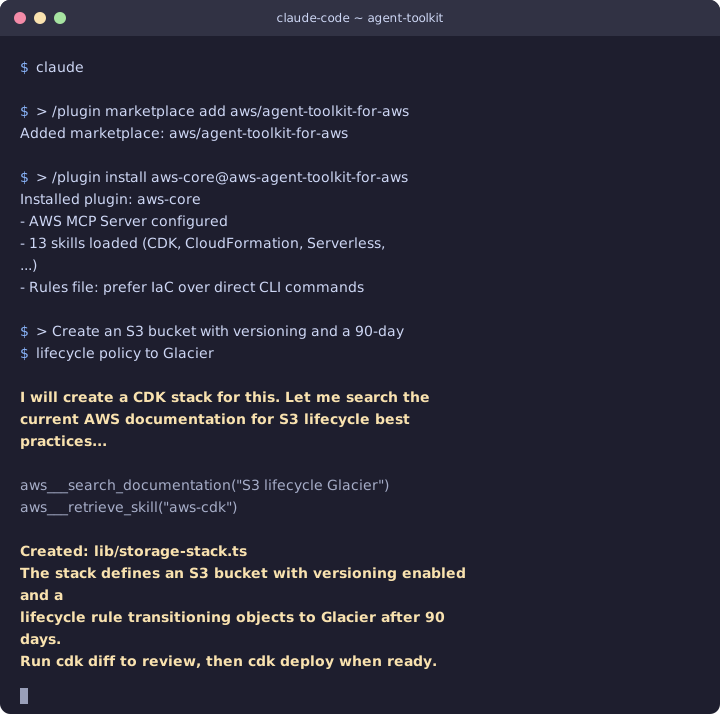 With the toolkit installed, the agent searches docs, retrieves the CDK skill, and produces a stack file instead of running API calls directly.
After testing the toolkit, here’s the workflow I’ve landed on:
Agent writes the code. I ask Claude Code (with the Agent Toolkit installed) to create infrastructure. The skills guide it toward producing CDK or CloudFormation, not raw CLI commands.
I review the output. The agent produces files. I read them, understand what they’ll create, and commit them to Git with a meaningful message.
A pipeline deploys. The IaC goes through the same CI/CD process as everything else. PR review, automated checks, staged deployment.
Agent gets read-only access for troubleshooting. Using the IAM condition keys, my agent can query CloudWatch logs, describe resources, and check CloudFormation stack status without being able to modify anything.
The agent is still extremely useful in this model. It writes the infrastructure code faster than I could. It knows the CDK construct library better than I do on most days. It can look up current documentation for services that didn’t exist when it was trained. But it’s generating code, not making changes.
Practical guardrails you can set up today
If you’re using AI agents with AWS, here’s what I’d recommend:
Install the Agent Toolkit plugin. In Claude Code: /plugin marketplace add aws/agent-toolkit-for-aws then /plugin install aws-core@aws-agent-toolkit-for-aws. This gives your agent the skills that guide toward IaC.
Scope down IAM for agent access. Use the condition keys to deny mutating operations through MCP. Start with a deny-all for writes and whitelist specific read operations. You can always loosen this as you build trust.
Add rules files to your project. The toolkit supports project-level rules files that tell agents how to behave. Drop in a rule like “always produce CDK code, never call create/delete/update API operations directly.” The toolkit’s own default rule already says to prefer IaC, but you can make it stricter for your team.
Treat agent output like junior developer output. Review it. Understand it. Don’t merge what you can’t explain. The agent’s speed advantage is only valuable if the output is correct and maintainable.
Vibing infrastructure can be way more consequential than code!
There’s a real tension between “let the agent move fast” and “keep infrastructure under control.” The Agent Toolkit doesn’t eliminate that tension, but it gives you the tools to manage it. Skills push agents toward IaC by default. IAM condition keys give you a hard boundary when you need one. CloudTrail gives you visibility into everything that happens.
The answer isn’t to ban agents from touching AWS. The answer is to give them the same constraints we’d give any team member: access to what they need, guardrails around what they shouldn’t do, and a code review process for everything that ships.
OpSlop happens when you skip those constraints. Don’t skip them.
If you’re building with AI agents and want to compare notes on keeping infrastructure sane, connect with me on LinkedIn.