Andrew Ng's Context Hub Has 68 APIs. Add Yours.
Context Hub is a curated documentation registry for coding agents. Here's how to add your API before someone else does.

Andrew Ng’s new open-source project, Context Hub, attempts to solve a problem every API provider has right now whether they know it or not. Coding agents are getting your API wrong.
They hallucinate parameters, use deprecated endpoints, and call the v1 API when v3 has been out for a year. Ng’s own example: ask Claude Code to call GPT-5.2 and it reaches for the older chat completions API instead of the newer responses API. Your users hit the same wall with your API, and they blame you for it, not the agent.
Context Hub is a curated, versioned documentation registry that coding agents can query from the CLI. Instead of guessing, the agent runs chub get your-api/docs --lang python and gets correct, current documentation written specifically for machines to consume. The repo has been quietly building, but Andrew’s LinkedIn announcement on March 5th, caught my attention, and lit the fuse. It went to over 1,500 stars in five days.
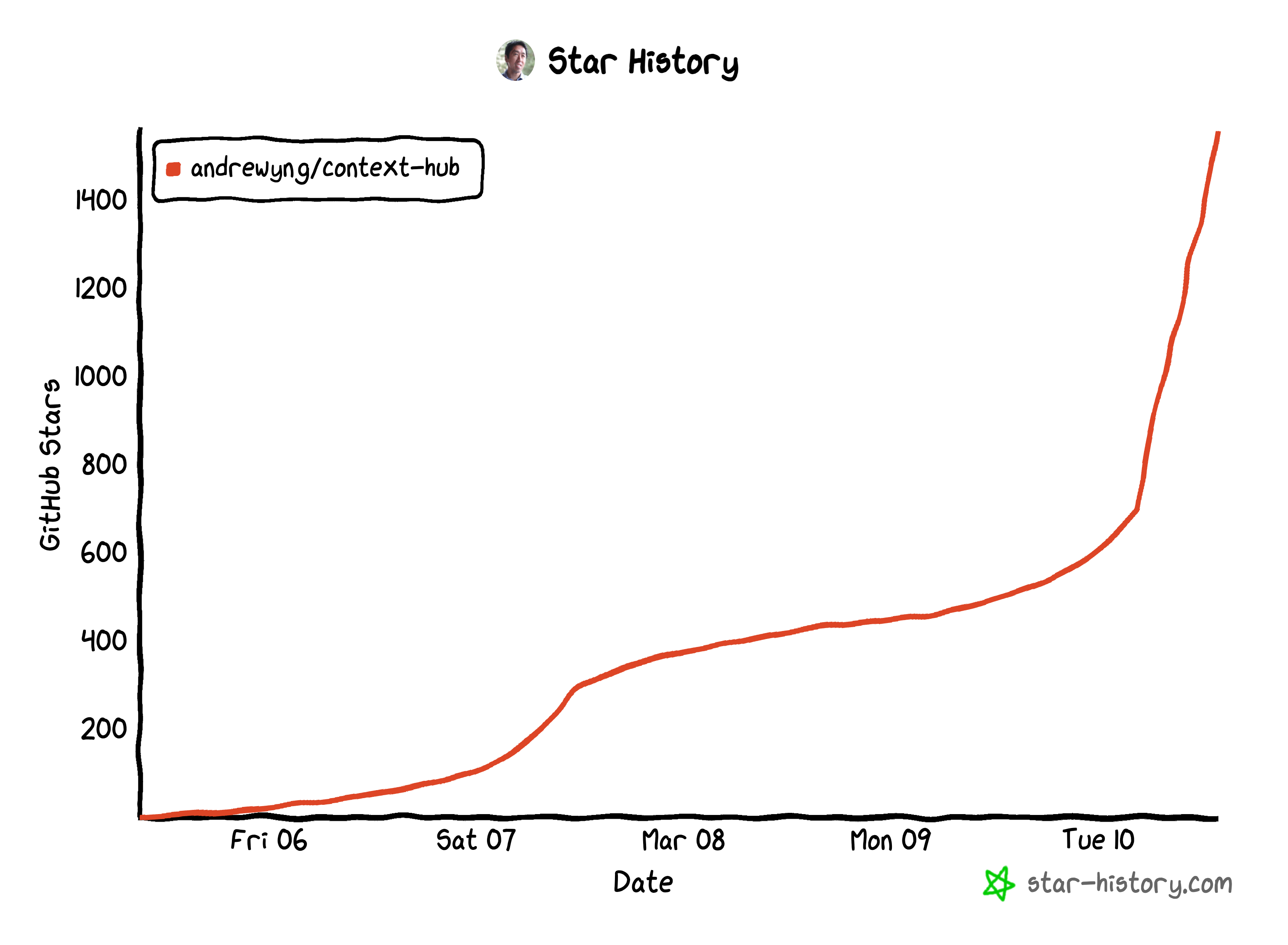 Star history from star-history.com, captured March 10, 2026.
(As of writing) The registry already has 68 API providers, including Stripe, OpenAI, Anthropic, Supabase, Firebase, Twilio, Shopify, and AWS too (where I work). PRs are rolling in daily with new submissions. If you maintain a library and it’s not in Context Hub yet, someone is going to write the docs for you. You probably want to be the one who does it!
How Context Hub Works
An agent (Claude Code, Codex, Cursor, Kiro, or anything with shell access) needs to call your API. Instead of relying on its training data, it runs:
1
chub search "your-api"
That returns matching entries from the registry. Then:
1
chub get your-company/your-api --lang python
That fetches your curated documentation, written for agent consumption rather than humans. Direct and example-heavy with no marketing fluff. The agent reads it and writes correct code.
There’s also an annotation system. If an agent discovers a workaround or a gotcha while using your API, it can save a note:
1
chub annotate your-company/your-api "Use v2 endpoint for batch operations, v1 has a 100-item limit that isn't documented"
That note persists locally across sessions. Your documentation gets smarter every time an agent uses it.
Adding Your API: Step by Step
1. Fork and Clone
[https://github.com/andrewyng/context-hub]
Then…
2. Create Your Folder Structure
All content lives under content/. The pattern is author/docs/entry-name/:
1
2
3
4
5
6
7
8
content/
  your-company/
    docs/
      your-api/
        python/
          DOC.md
        javascript/
          DOC.md
If your API only has one language, skip the language subfolder:
1
2
3
4
5
content/
  your-company/
    docs/
      your-api/
        DOC.md
If your docs are going to be long (and they probably are), plan for reference files from the start:
1
2
3
4
5
6
7
8
9
10
content/
  your-company/
    docs/
      your-api/
        python/
          DOC.md
          references/
            auth.md
            errors.md
            advanced.md
Reference files are plain markdown, no frontmatter needed. Agents fetch them with chub get your-company/your-api --file references/auth.md or chub get your-company/your-api --full.
3. Write Your DOC.md
Every documentation file needs YAML frontmatter followed by the actual content:
1
2
3
4
5
6
7
8
9
10
11
---
name: your-api
description: "One-line description that shows up in search results"
metadata:
  languages: "python"
  versions: "2.1.0"
  revision: 1
  updated-on: "2026-03-10"
  source: official
  tags: "relevant,comma,separated,tags"
---
The source field matters. Use official if you’re the API provider, maintainer if you’re a core contributor, or community if you’re a user who wrote the docs.
The versions field tracks the package version on npm or PyPI, not your internal API version number.
Now for the content. Remember you’re not writing docs for humans. You’re writing docs for an agent that needs to produce correct code on the first try. Structure like this:
- Golden Rule - State the correct package name, install command, and import pattern. Warn against common mistakes right up front (wrong package names, deprecated imports).
- Installation - The install command. That’s it.
- Initialization - How to create a client instance, auth setup, environment variables over hardcoded keys.
- Core Operations - The 3-5 most common operations with complete, runnable code. Every example should include the function call with realistic parameters and the response shape.
- Key Patterns - Pagination, streaming, retries, webhooks. Only what’s relevant to your API.
- Common Mistakes - The 3-5 things agents frequently get wrong. This is gold. If you’ve ever seen an agent produce wrong code for your API, put the fix here.
- Models / Resources / Endpoints - List current model names, resource types, or endpoint paths explicitly.
Keep the main DOC.md under 500 lines. If you’re going past 400, start moving advanced content into reference files.
A concrete example of what good looks like:
1
2
3
4
5
6
7
8
9
10
11
12
13
14
15
16
17
18
19
20
21
22
23
24
25
26
27
28
29
# Acme Payments Python SDK

## Golden Rule
Always use the official `acme-payments` package from PyPI.

**Install:** `pip install acme-payments`
**Import:** `from acme import PaymentsClient`

## Initialization

import os
from acme import PaymentsClient

client = PaymentsClient(api_key=os.environ["ACME_API_KEY"])

## Create a Charge

charge = client.charges.create(
    amount=2000,        # in cents
    currency="usd",
    source="tok_visa",
    description="Order #1234",
)
print(charge.id)  # "ch_abc123"

## Common Mistakes
1. Passing amount in dollars instead of cents
2. Not handling idempotency keys for retries
3. Using test keys in production
Compare that to what you see too often in regular documentation:
1
2
3
4
# Welcome to the Acme Payments Developer Hub!

Acme Payments provides a powerful, scalable platform for payment processing.
Let's explore what you can build...
Agents don’t need introductions or marketing. Lead with code, cover the common cases first, and put edge cases in reference files.
4. Handle Multiple Versions (If Needed)
If you have breaking changes between major versions, use version subfolders:
1
2
3
4
5
6
7
8
content/
  your-company/
    docs/
      your-api/
        v1/
          DOC.md
        v2/
          DOC.md
Both files share the same name in the frontmatter. The build system combines them into one registry entry, with the highest version as the default. You can nest language folders inside version folders too.
For minor version differences, just document the latest and note any gotchas inline.
5. Build, Validate, and Test
Install the CLI if you haven’t:
1
npm install -g @aisuite/chub
Validate your frontmatter and structure:
1
chub build content/your-company/ --validate-only --json
The validator checks that name, metadata.languages, and metadata.versions all exist in your frontmatter (errors if missing), and warns about missing description or source fields. If you get a non-zero exit code, fix the DOC.md and re-run. Once it passes, check that the counts match what you created (if you wrote 2 DOC.md files, the output should show "docs": 2).
Then do a full build and test that your doc is actually fetchable:
1
chub build content/your-company/ -o /tmp/chub-test/
6. Submit Your PR
Push your branch and open a PR against andrewyng/context-hub. Look at the existing PRs for examples of what good submissions look like.
Hey! This Reads Like a Skill. Because It Is…
If you’ve been following along and thinking “this whole process could be a skill file that I hand to my agent,” you’re right. The step-by-step above is structured the same way: gather inputs, create a folder structure, write content following a template, validate, test.
So I made one. Here’s a create-api-docs skill you can drop into your project. Install it and your agent can scaffold a complete Context Hub submission for any API. You give it the API name, the package version, and your source material, and it produces a DOC.md that follows all the conventions above.
But, and I can’t stress this enough, don’t just run the skill and submit the PR. The entire point of Context Hub is accuracy, because agents get APIs wrong. If you let an agent generate your docs unchecked, you’re feeding the same problem back into the system. The skill gives you a solid first draft and the right structure. You still need to read every line, verify every code example, and check every parameter against your actual API. Your users are trusting these docs to produce correct code. That’s a responsibility, not something to automate away entirely.
Why Bother?
Every time a coding agent hallucinates your API, that’s a developer who just had a bad experience with your product. They’ll spend 20 minutes debugging code that was wrong from the start, and they’ll associate that friction with your API, not with the agent.
Context Hub gives you a way to fix that at the source. Write the docs once, in a format agents can consume, and every agent that uses the registry gets it right.
The community only found this project five days ago, and it’s already at 1,500+ stars, 164 forks, and getting commits daily. The window where your submission is one of the first 100 is closing. If your API or framework isn’t in Context Hub yet, go add it.
1
npm install -g @aisuite/chub
Start there.